

Pinterest Ads Traffic Campaign the Ultimate Guide

Pinterest Ads Traffic Campaign.
Pinterest Promoted Pins. You’ve seen them. And if you see them over and over again then they must be working?
Right?
You’re curious about them. Would they keep spending money on ads if they didn’t get results?
Right?
But you might feel unsure about whether or not they are right for you and your blog. Or even if you can afford Pinterest ads or not. If these are some of the doubts you have about, I hope I can put some of those doubts to rest.
My Pinterest ads tutorial will show you everything I learned from Pinterest gurus about creating a Pinterest traffic ads campaign. Pinterest ads allow me to get 2,000-page views on a new beauty blog in a highly competitive market, just in three months.
Pinterest ads provide a tremendous opportunity for a new blog to get in front of your ideal people.
The Complete Pinterest Advertising Guide to More Valuable Ads
This is a complete Pinterest Traffic Ads campaign guide to help you to gain traffic to your beauty, skincare, or lifestyle website.
In this Tutorial You’ll Learn:
- What is a traffic campaign on Pinterest?
- How much Pinterest ads cost?
- How to set up a traffic campaign on Pinterest in 2020?
- Pinterest ads best practices
- Mistakes to avoid
If you are interested in running traffic ads on Pinterest, then you already have a business account and you also know that Pinterest not a social media platform but a search engine, like Google.
Between you and me, I think Pinterest wants to be like Instagram. They constantly adding similar functionality (LIKE button, comment section and etc.)
Let’s get back to Pinterest traffic campaigns.
What Is A Pinterest Ads Traffic Campaign?
With Pinterest ads Traffic Campaign, you pay only when someone clicks through to your site.
In Pinterest’s advertisement you can create campaigns, ad groups, set your bid amount, and track the results.
For example, I wrote an article about “Best Hand Cream for Dry Hands” (with affiliate links) and wanted to create traffic to it.
Before we get into the details of creating your first ad, let’s look at how campaigns are structured.

There are three levels:
✔ Campaign. This is where you set the objective for your campaign. For our example, it will be TRAFIC.
✔ Ad group. This is where you will enter your ad budget, choose your audience. Also, depending on the objective, you can create more than one ad group in each campaign. This is where you will set a budget, bid, and run dates.
For example:
You want traffic to your blog opt-in sign up – it’s campaign.
You want to create separate campaign for the same pins base on Keywords or engagement. This will be different ad groups. Ad groups let you address the different keywords, audiences, regions.
Ad group 1 – visited my site in the last 90 days
Ad group 2 – keyword base audience
Ad group 3 – interest base audience
✔ Promoted Pins. This is the last step in setting the campaign and what users will see – your PINs. You want to advertise a few pin designs for one blog post. See which variation works best and switch off the rest.
Pinterest is one of the best-paid advertising platforms for Pay-Per-Click Advertising (PPC) and if you are looking for options to spend your marketing budget, you can’t go wrong with Pinterest.
What Is the Difference Between Traffic and Conversion Campaign?

In TRAFFIC CAMPAIGN you are paying for the initial click to your site. This campaign is best for lifestyle bloggers, that earn money with ad networks and affiliate programs.
You pay to Pinterest each time viewer clicked on your promoted pin.
Once your pin is clicked on, it’s up to you to convince your visitor to purchase the product through your affiliate links.
If you are a more service-oriented blogger. Let say for example Pinterest Manager, then a conversion campaign will be better for you. With CONVERSION CAMPAIGN, you place a bid on how much you want to pay for the conversion, not per click.
This means if the viewer clicked on your pin let say 10 times and visited your site, but only one clicked on sign up form to your course. You will pay for one conversion.
Conversion Campaigns allow you to optimize for a specific action you want your Pinterest visitors to take (email signup or purchase) and gives you a better return on investment.
Back to traffic campaign.
If you bid $0.25 on each click through your pin and set daily limit to $1.00.
The result – you paid for 4 clicks to your site. Basically, you are telling Pinterest, bring 4 people a day to my site.
If you want more visitors to your blog, then you have to set your daily budget higher and bid lower. The lowest bid that you can set is $0.10.
At the end…
It’s up to you how much you are willing to spend.
From my personal experience, you will not see organic traffic from Pinterest in 2020 for a new blog. Traffic campaign is the most economical way to spend your money on Pinterest for a beginner blogger, to bring traffic to your site.
Per Pinterest
Choose an advertising goal that works best for your business based on what you want people to do after they see your ad. Pick your goal based on what’s most important to your business for this specific campaign.
If your main goal is to get people to go to your website or drive sales, start a traffic campaign. You can also track what people do on your site after they leave Pinterest by setting up conversion tags.
TIP: Select “Pause Campaign” if you don’t want to launch your campaign immediately. This will create a draft of your campaign so you can review all the details before your ads go live. To create your campaign in a paused state, check the box next to the “Pause Campaign?”
How Much Do Pinterest Ads Cost in 2020?

CPC (Cost Per Click) is an average of how much you have paid per click to your website. The minimum bid for CPC campaigns is 10 cents. In general, small to midsized businesses can expect to pay around 10 cents to $1.50 per click for Pinterest advertising.
Pinterest aims to get you the most clicks at the lowest possible cost-per-click.
TIP: With Pinterest Ads
- You do not pay for a click that comes from your previously paid promoted pins
- You can earn low-cost clicks, email signups, and checkout conversion
- There is less competition with promoted pins than other ad platforms
- It will boost your organic traffic
Per Pinterest
Q: How much do Promoted Pins cost?
A: With traffic campaigns, you only pay when someone clicks through to your site. And similarly, with engagement campaigns, you pay when someone engages with your Pin through closeups, saves, or clicks.
However, you decide how much you want to spend each day for each campaign—you’ll never spend more than the daily budget you set for it.
Per Pinterest “Set your bid”
“Remember, you will only pay the minimum amount required at any given time no matter what you set your bid to. If you set your bid to $3 and the minimum amount required to win an auction is $0.50, only $0.50 will be used.
Automatic bidding is only available for traffic campaigns and is the default setting for advertisers running traffic campaigns.
Automatic bids are managed by Pinterest instead of you. Bids are updated by Pinterest automatically several times a day. Pinterest aims to get you the most clicks at the lowest possible cost-per-click (CPC) while also spending your entire budget.
The automatic bidding strategy can produce cost fluctuation, usually at the beginning of a campaign, as Pinterest’s delivery algorithm searches for possible outcomes. For example, if auction competition decreases, costs may go down. If auction competition increases, costs may go up.
Keep in mind that ad group level budgets are still required.”

Impressions. How many times your pin has been shown to the potential viewer while they are scrolling through the feed.
Clicks. The number of clicks I received to my website
CTR (Click-Through Rate). 1% or higher is a good number to reach here.
CPC (Cost Per Click). CPC is average of how much you’ve paid per click to your website (the minimum you can bid is $.10 UDS). Pinterest gurus recommend starting from $.20.
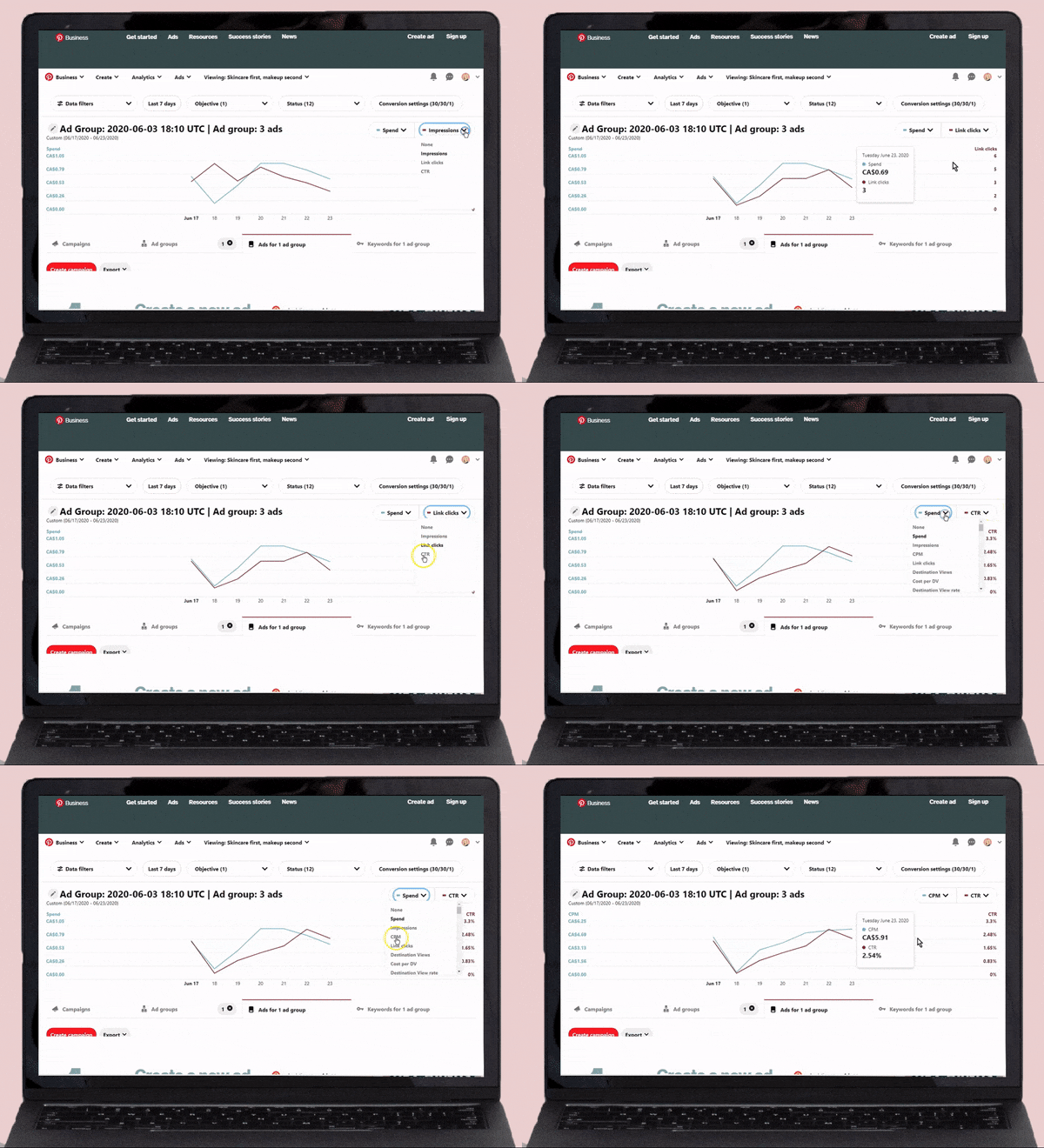
Now that you know the cost of promoted pins, we can dive into further detail on how they work and how you can set them up.
EXAMPLE: You set your budget, not Pinterest. My first campaign was $ 2.00. Now I allocate $ 50.00 a month from my budget to Pinterest Advertisement. Once I learn more about ads and promotional pins, I will increase the amount.
How to Create Pinterest Ads and Campaigns?
Before you start read Pinterest Advertising Guidelines.
✔ You need to have a Pinterest Business Account. You can name it the name of your business.
✔ Then set-up your billing method, which would be the credit card used to pay for your Pinterest ads.
✔ Add your business settings including your business name and address.
✔ Make sure that you claimed your website with Pinterest. If you are not sure how to do it, Pinterest has a huge article on How to Claim Your Website. By confirming your website, you are able to make audiences and track your Pinterest pins
STEP 1 – Install the Pinterest Tag
The Pinterest Tag is essential for running Pinterest ads.
It allows you to monitor the Pinterest audience that comes to your blog through ad campaigns. Get audience insights, create audiences, and measure your return on ad spend (RoAS).
You can find latest instructions on how to do it in Install the Pinterest Tag.
Once you claimed your website and installed the Pinterest tag, it’s time to create an audience.
STEP 2 – Create Pinterest Audience
Go to Ads tab on your Pinterest profile and click Audiences.

Explanation of Pinterest Audience Type
Visitors who went to your site – basically it’s a re-marketing.
A list of customers that you upload – exporting your email list or your customer’s list, something like that. You upload a list of customers and Pinterest will be able to match the email to people who actually use Pinterest.
An engagement audience that engaged with Pins from your confirmed domain – people who engaged with pins from your domain. That’s why you want to confirm your website (domain) with Pinterest. It’s similar to visitors that went to your website people. Pinterest will target people that engaged with your pins in the past. You can add a filter to engage the audience.
An act alike audience that behaves similarly to the one you already have – an audience that performs similar to the audience that you already have. It will be based on Pinterest data. Pinterest will take people that visited your website before or engaged with your pins and create an audience that acts like them, have similar interest, etc.
It will be the largest size audience and a bit broad. But also, you will reach and engage new people with your content or product.
The first THREE audiences perform best because they targeted people who already been to your website and familiar with your brand.
Visitors That Went to Your Website.
If you just STARTING with your very FIRST ad campaign, start with this audience, even if its only 100 people.
Give a name and description to your audience.
You can add a filter to your audience.
Choose interval, people who went to your website in the past 30, 90, or MORE days. If you want a bigger audience to enter a larger number here.
Pinterest has a thresh hold of 100 people before they start to serve your ad to them.
Select Include past traffic.
Act Alike Audience
It will be based on Pinterest data. Pinterest will take people that visited your website before Visitors That Went to Your Website and create an audience that acts like them, have similar interest, etc.
You can select if you want Act Alike Audience very similar to the one that you have, then choose 1%.
The more you go up in percentage, the more your audience will be, the more you will spend ad-dollars to reach them.
A lot of this depends on
- How large the audience you want to create?
- How much traffic you are getting?
- How many people engaging with your pins?
If you are starting your first ad campaign or an audience, your ads may not run for a day or two until your audience will be created.
The ideal situation will be to have a more targeted campaign. For example, when you have a lot of traffic and choose visitors to your website in the last 7 days (worm audience) and choose Act Alike Audience 1% match to them.
If you are a new blogger and don’t have that many visitors, then start with what you have. I started with 0 visitors to my blog.
STEP 3 – Upload or Choose Your Pins for Ad Campaign

Create pins that you want to promote withing your ad campaign to the most relevant board or choose existing most popular pins.
TIP: The best part of Pinterest advertising, that your pins will get more organic activity after you advertise them. Just don’t forget to use keywords in the pin title and description.
STEP 4 – Set Up Your Campaign
Watch this video for step-by-step instructions on how to set up the Pinterest ads traffic campaign. It’s just a bit outdated but the main idea is still the same.
This is the video I followed to set up my first 5 Pinterest ads traffic campaigns.
In the video, he mentioned the Google campaign URL builder. Here the link to a Google Campaign URL Builder.
Read step 6 for more details.
STEP 5 – Keyword vs Interest Targeting
You will have two choices for your Pinterest traffic ad campaign KEYWORD or INTERESTS audience targeting.
Keyword targeting – when you target according to keywords, your ad will appear when people type in one of the keywords, you’re targeting in the search bar.
Interest targeting – If your ad targets people according to interests, it means it will show on the newsfeed of people who are interested in specific topics.
When choosing your targeting for the first time, start with keyword targeting first.
Then, check your audience analytics, which will show you the interests of the people who have clicked on your ads.
When you are creating an ad campaign next time, you can make the right choice in terms of targeting people’s interests, instead of guessing.
TIP: You are spending YOUR MONEY to put your ad in front of the people for each particular keyword or interest in your ad campaign. Choose wisely.
Watch video [PINTEREST PROMOTED PINS] Lessons from a $35,000 Pinterest Ad Campaign, where Angie will walk you through, her process of analyzing keywords and ad performance.
STEP 6 – Pinterest Campaign URL Builder for Pinterest
Link to a Campaign URL Builder. https://ga-dev-tools.appspot.com/campaign-url-builder/
I just started with Pinterest advertisement marketing and find that Pinterest ads analytics provide everything I need.
Pinterest Ads Best Practices
Per Pinterest
Q: Which Pins should I promote?
A: Pick a Pin that’s already doing well on Pinterest—you can see which Pins have gotten the most views, clicks, and saves on analytics. Just make sure that your Pin is following our Advertising Standards.
If you promote multiple Pins in a campaign, our system will take the Pin that’s performing the best and show it the most often.
Standard Pinterest Pin
These Pinterest specs apply to both standard organic Pins and standard Promoted Pins.
Images File type: PNG or JPEG
Max file size: 10 MB
Aspect ratio: 2:3 aspect ratio, or 1000 x 1500 pixels.
Pins with an aspect ratio that’s greater than 2:3 might get cut off in people’s feeds.
Character counts Title: Up to 100 characters. If you don’t fill out a title, people will see your Pin description instead.
Description: Up to 500 characters. The first 50-60 characters are most likely to show up in people’s feeds, so put your most important info first.
You can use Pinterest analytics to find what’s working best for your brand.
You can find an ad analytics dashboard by clicking Ads at the top left. -> Then Campaigns.
Use the dashboard to analyze which ads are performing best and switch off ads that don’t perform for you.
Mistakes to Avoid
5 Costly Mistakes Blogging Beginners Make with Pinterest Promoted Pins
MISTAKE 1
Not Having High Quality Images
Make sure that title on your pin is easy to read. That your call to action is clear, it’s not the time to play on words or cute names. A good example will be: click here or read more.
Your headline should be a keyword reach and easy to read (no swirly font).
You know what happens when user can’t read your pin?
They keep on scrolling.
They don’t get to have a closer look at your pin. They only get to look at your pin, click on it, and then go to the page that you linked to immediately.
Make those pins good and make them count.
- Eye-catching, thumb-stopping design.
- Don’t combine multiple images per promoted pin
- Don’t exceed four products images
- The pin has a single theme
Pinterest often updates their creative best practices. Bookmark this link and check back before you set up your ad campaign.
MISTAKE 2
Luck of Sale Funnel
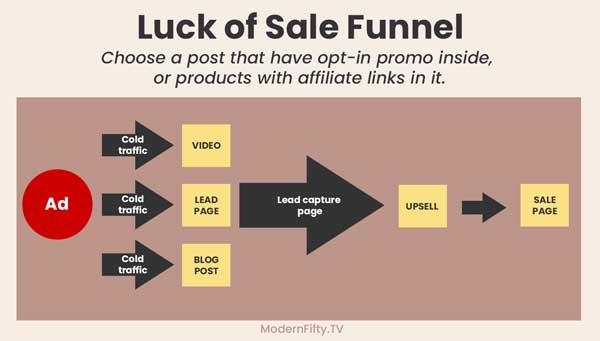
Creating Pinterest ad campaign for a post without any CTA (call to action).
Choose a post that has opt-in promo inside, or products with affiliate links in it, or at list advertisement.
Basically, something that will give you monetary reward.
Don’t spend your hard-earning money on just a highly valuable post.
Send the audience to a piece of your content, where you capture their e-mails and then keep upselling to them your product or services.
Also choose posts that appeal to broader audience.
For example, how many searches do you think on Pinterest for a keyword on “Is it too late to start a blog after 50” vs “Best moisturizing creams”?
The best kinds of pins to promote, the once that have keywords that can be actually be found in the Pinterest keyword tool.
MISTAKE 3
Ad Targeting
Pinterest users come to Pinterest, to FIND IDEAS for a solution to there problem. And they go to GOOGLE to find a SOLUTION to a problem.
If you decide to advertise a product that you created (digital or physical), write an article about it and advertise an article.
FOR EXAMPLE: if you wrote an e-book, created a pin using book cover, and then created an ad campaign linking straight to the sale page.
You will be getting lots of impressions and some click-through as well.
But sales? Not so much.
MISTAKE 4
Creating One Pin Image Per Campaign
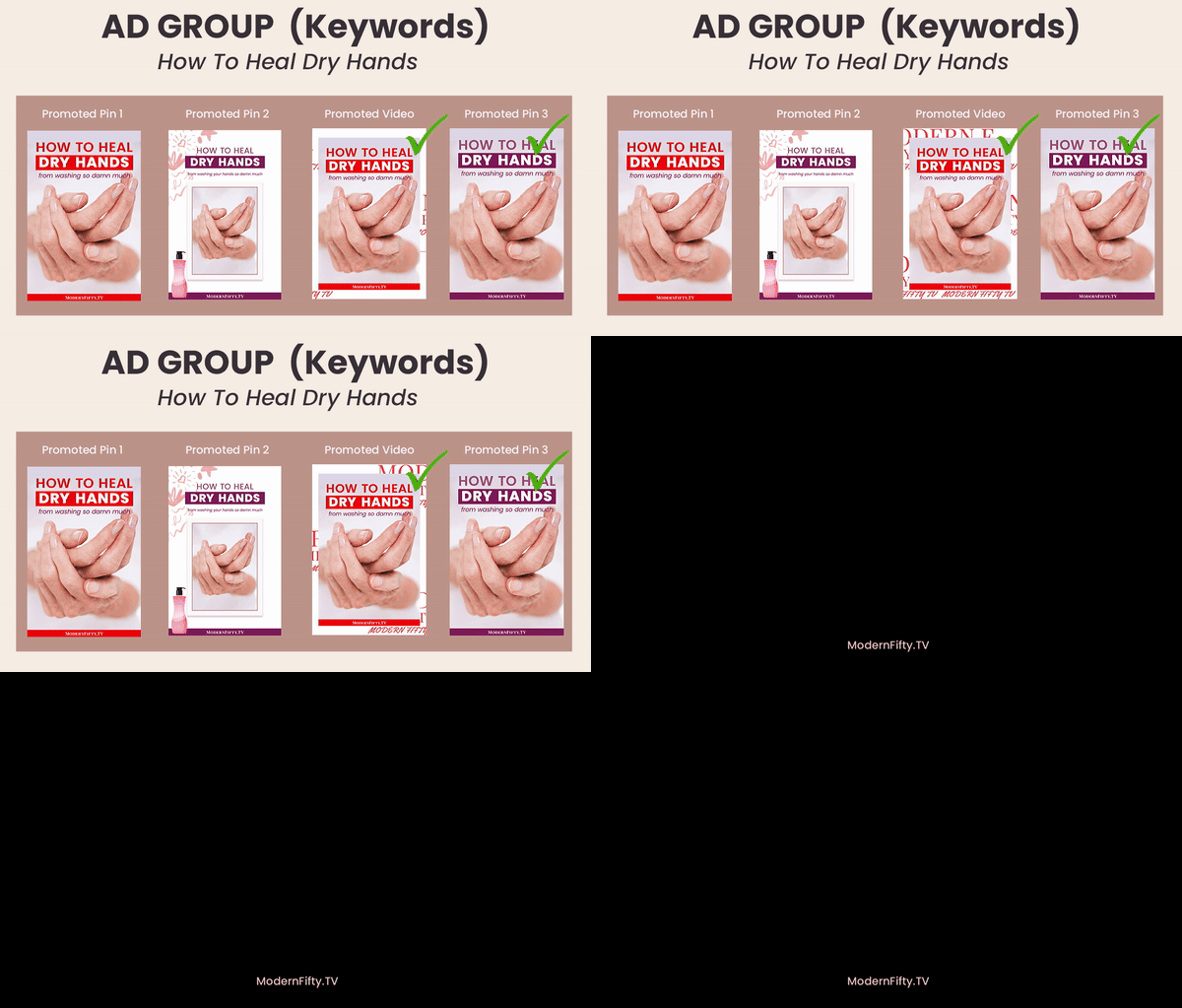
Don’t rely on a single pin-ad, instead create a few pin images. Test different pin design and the description.
You soon will notice that some images and some description perform better than the others.
You can run an advertising campaign with few images for a few days or a week, see which performs better, switch off (stop promotion) the others and continue to run the best performing add(pin).
Per Pinterest
If you promote multiple Pins in a campaign, our system will take the Pin that’s performing the best and show it the most often.
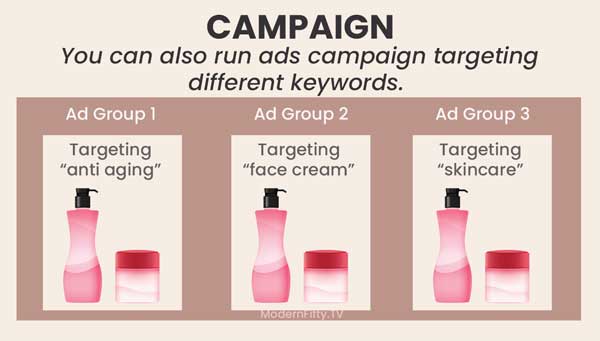
You can also run ads campaigns targeting different keywords. For example take the same image for skincare products you want to promote and run add targeting keywords;
- Anti-aging
- Face cream
- Skincare
This way you can determine which set of keywords performs better.
MISTAKE 5
Not Optimizing Your Account
You will notice when you launch your pin, your ad will have a link back to your profile.
People may see your ad and click on your profile link, it’s important that your account doesn’t look bare.
Make sure
- You have several boards, that have several pins in them.
- Boards are targeted to the interest of your audience.
- BIO is completed and underlines how you solve specific problems, what you specialize in, and what makes you unique from everyone else.
- profile picture.
MY FINAL TIP: Go for it if it’s in your budget. Don’t give up easily, build your followers.
You can find latest information About Ads on Pinterest.

GOT A QUESTION?
Do you have any questions about Pinterest Ads Traffic Campaign the Ultimate Guide? Let’s talk about it in the comments below!
I would love to hear from you! Have a fabulous week and take care!
Irina Nikitina – Founder of Modern Fifty TV
DON’T FORGET TO PIN IT!
If you enjoyed the content of this blog post and found it valuable, please save it to Pinterest so that other people can read it too!
THINGS TO READ NEXT:
3-part mini-series will give you an overview of how to audit your brand’s Pinterest account and make sure you are getting the most out of your time and money.
✨ READ PART 1: “How to audit Pinterest profile.”
✨ READ PART 2: “How to audit Pinterest boards.”
✨ READ PART 3: “Are your Pins optimized?”
- How to Create a Pinterest Story
- 10 Profitable Blog Niches Ideas
- 5 Tips on How to Conduct Market Research for Your Blog’s Content And Find Profitable Keywords
- 7 Best Ways to Make Money Blogging for Beginners
- Midlife blogging: Am I too old to start a blog?
- Pinterest Algorithm: How Pinterest sees pin images
Have you tried Pinterest ads? My first ads were not terribly expensive. I spend less than $50.00 a month. It was a great learning experience. I am sure will continue.
My three-part mini-series will give you an overview of how to optimize your brand’s Pinterest account and make sure you are getting the most out of your time and money.
✨ READ PART 1: “How to audit Pinterest profile.” https://modernfifty.tv/pinterest-profile-audit/
✨ READ PART 2: “How to audit Pinterest boards.” https://modernfifty.tv/how-to-audit-pinterest-boards/
✨ READ PART 3: “Are your Pins optimized?” https://modernfifty.tv/how-to-optimize-pinterest-pin/