

Pinterest Algorithm: How Pinterest sees pin images

Are pin images important for Pinterest algorithm?
Are you struggling to get a good amount of traffic from Pinterest? Then you need to know the secret to make pins appear in the right search.
Designing beautiful Pinterest images that are high-quality and visually look great is important, that’s for sure, as using keywords in all the right places.
But the pin visual aesthetics aren’t the only thing that helps your pin to rank hire. FIRST, your pin has to appear in the right search.
In this post, you’ll see my original SEO experiment on why Pin cohesion is important.
- How Pinterest index image content
- How to find out the classification of your pin
- Pin image experiment
Let’s go!
If you like this video, be sure to SUBSCRIBE to my YouTube channel.
Pinterest Algorithm: How Pinterest sees pin images
How many times you heard?
“Remember, Pinterest is a visual search engine. There could be many reasons why your Pin isn’t showing in the search. No relevant keywords in the Pin description. No relevant keywords in the Board it’s been Pinned to. SEO and keywords are so important in Pinterest.”
For 3 years I did exactly that. Searched for keywords and included them in
- profile description,
- profile name,
- board name and description,
- pin title and description,
but after the 2020 Pinterest algorithm changes, I started to question everything I knew and started to do my own experiments.
Pinterest is VISUAL SEARCH engine: What does it mean?
Pinterest CAN SEE your IMAGE/PHOTO, but what exactly Pinterest see and how?
To find out answer to this question, I decided to run my own experiment.
Following set guidelines for the style, photos, and text for Pinterest images you create will rank your pins higher in the app, gaining more exposure and engagement from users who search for keywords that relate to your content.
How Pinterest Sees Pin Images
On March 28, 2019, the Pinterest engineering team published the article “Building Pin Cohesion”. It’s about a visual discovery engine and so far the last detailed article in a human language.
Pin Cohesion or Indexing of The Pin
Pinterest index pins by measuring relevance between Pin and linked webpage. Pinterest algorisms measure visual and sematic similarity between image and text content of the pin and determine if a pin is valid and how valuable it is in the Pinterest ecosystem.
“As people save Pins to their boards, we get a sense of the context surrounding Pins thanks to the human-curated contents, such as the board names, the Pins’ titles and descriptions, and so on. These signals are usually rich enough for us to generate text labels for each Pin, serving as the onsite text signals when calculating text relatedness.”
Pinterest took 10K search queries of 2018 with the most traffic and out of the created a vision model that classifies an image.
SIDE NOTE: Since 2019 Pinterest implemented a LOT of CHANGES, such as fresh pins, video pins, and story pins. The use of keywords is just a beginning in Pinterest’s marketing strategy, there is so MUCH MORE to it.
✨Stay tuned for more experiments.👀

For example, the algorithm classified the image of Audrey Hepburn as “Audrey Hepburn style” and “1950s fashion.” Not a woman on the windowsill, not a guitar, and not actress Audrey Hepburn, something to think about. 😉
Pinterest used in 2019 two methods for reading pin image and text overlay: image classification and optical character recognition.
- FIRST, it transforms an image to text
- SECONDARY extract text from the image
- THIRD compare image to text similarity
✔ To make it clear they are talking about TEXT OVERLAY on a pin.
THEN algorism run set of signals to SCORE pin
- Relatedness of a keyword to a link’s text content
- Relatedness of pin image visual to link page images
- Is a link’s text content being complimentary to the Pin image topic?
With all signals in place, Pinterest builds a binary classifier and RANK PIN.💡
That is how algorithm determine what surfaces in search and home feed.
“With this approach, the newly written document is not searchable until index commit is called.” – source.
How long it takes for Pinterest to index pin? The whole process takes from 5 days to a month. It depends on your account age and authority.
How to Find Out Classification of Your Pin
I know only one way to see how Pinterest classified/cataloged your pin. It’s not 100% accurate, but it will give you a general idea.
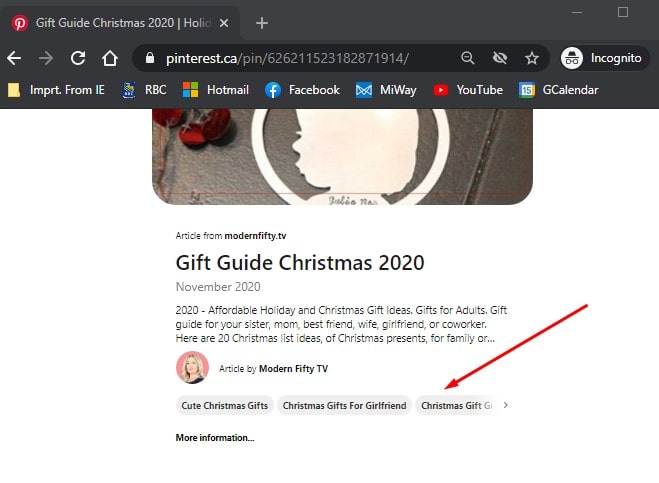
- You pull a pin URL that you want to know how Pinterest cataloged it.
- You go to Chrome incognito mode and you put that URL in the address bar
- And you will see the pin description and directly below that you will see some little boxes with terms/categories that Pinterest cataloged this pin with.
Pin Image Experiment
I decided to conduct my own experiment. I wanted the experiment to be as accurate and valuable as possible. For that, I created a separate Pinterest board just for this experiment and let pins mature for 2 months.
SIDE NOTE: During this time my Pinterest account was caught in a “spam sweep” or new update. But I don’t think it affected the results of this experiment.
EXPERIMENT OBJECTIVE:
To find out how Pinterest categorise/see images. NOTHING ELSE.
RESOURCES:
1// My article “The Best 20 Personalized Holiday Gift Ideas” published on November 9, 2020.
2// KEYWORDS: Personalized Holiday Gift and Christmas gift, was used throughout the experiment.
Pinterest BOARD NAME: Christmas Gift Ideas 2020.
BOARD DESCRIPTION: This board is all about Christmas gift ideas for a girlfriend and Christmas gift ideas for family and friends! From DIY Christmas gifts to new, unique, and cute Christmas gifts I’ve got you covered!”
All pins had the SAME TITLE, text overlay and PIN DESCRIPTION.
PIN TITLE: Gift Gide Christmas 2020
PIN DESCRIPTION: 2020 – Affordable Holiday and Christmas Gift Ideas. Gifts for Adults. Gift guide for your sister, mom, best friend, wife, girlfriend, or coworker. Here are 20 Christmas list ideas, for Christmas presents, for family or friends. Christmas gift for girlfriend. #gifts #giftideas #christmasgifts #giftsforfriends #giftsforfriend #giftsideas #holidaygifts #giftguide.
I was afraid that the Pinterest algorithm will not categorize some gift images, such as a tumbler or a keychain as a Christmas gift. But I am happy to say that results pleasantly surprised me.
EXPERIMENT RESULT:
Pins that were categorized the way I wanted them and would be shown to Pinterest users searching for ideas to buy Christmas gift ideas.
Event Planning -> Holiday -> Christmas -> Christmas Gift Idea
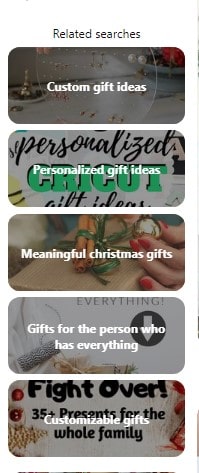
It also will appear in related searches:
- Best Friends Christmas Gifts
- Cute Christmas Gifts
- Christmas Gifts for Girlfriend
- Christmas Gift Guide
- All Things Christmas

The next category also close to Gift Giving idea, however, these pins will be shown to the audience that searches for DIY Christmas gift ideas to do: NOT my IDEAL TARGET for this article.
Explore->DIY And Crafts->DIY Event->DIY Christmas->DIY Christmas Gifts
It also will appear in related searches:
- Christmas Presents for Wife
- Christmas Gifts for Adults
- Cute Christmas Gifts
- Christmas gift Guide
- Gifts for Wife
- All Things Christmas
- Holiday Gifts
- Best Friends Gifts
- Gifts for Friends


Explore->Event Planning->Gifts->Gift For Adults
Again, pins that were categorized the way I wanted them and would be shown to the Pinterest users searching for ideas to buy Christmas gift ideas.

I find it’s interesting that these⬇⬇⬇ three images were categorized as gifts for ROOMMATE.
Explore->Event Planning->Gifts->Gift for Adult->Roommate Gifts
It also will appear in related searches:
- Christmas Presents for Wife
- Cute Christmas Gifts
- Christmas Gift Guide
- All things Christmas
- Holiday Gifts
- Gifts for Friends
- Gift ideas
- Mom

Related Search look like this ⬇⬇⬇
CONCLUSION:
I am happy with the results; Pinterest is much better at recognizing pin images and categorizing them than two years ago.
📌 Pinterest categorized some gift photos as a DIY object and put pins in DIY gift categories. After all, they are handmade Etsy items and their photo already exist on Pinterest.
It’s a great lesson on using stock images for your Pins, you don’t know who used this image before and how Pinterest categorized it.
📌 The fewer keywords you use the better. It will help Pinterest to determine to whom to show this pin.
📌 Be strategic with text overlay on pin.
📌 If one of your pins does not bring traffic to your site, check how it’s categorized. You may be surprised.
✨For next experiment I will create the same pin with description and without, can’t wait for result.
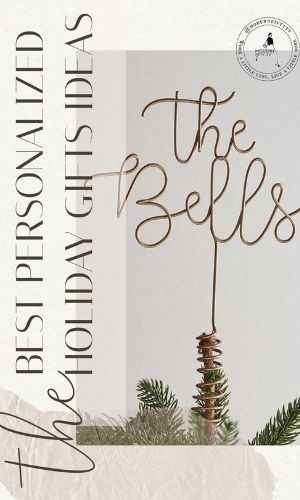
Pin with the most clicks (73 clicks to site) was ⬇⬇⬇
READ NEXT:
3-part mini-series will give you an overview of how to audit your brand’s Pinterest account and make sure you are getting the most out of your time and money.
✨ READ PART 1: “How to audit Pinterest profile.”
✨ READ PART 2: “How to audit Pinterest boards.”
✨ READ PART 3: “Are your Pins optimized?”

DON’T FORGET TO PIN IT!
If you enjoyed the content of this blog post and found it valuable, please save it to Pinterest so that other people can read it too!
I think you are onto something here.
I remember seeing your posts in the Pinterest business community – yeah, Pinterest is yet to fix those issues we complained about.
Glad to see that you tried figuring out how the algorithm works.
I gave Pinterest a break!!!
Will stick around to see what you come up with, maybe it could help revamp my interest in pinterest.
You mentioned algorism a lot, did you mean algorithm?
I fill that even with all the hiccups Pinterest has, it’s still the best platform for beginner bloggers to boost Google SEO. After the December crash, my traffic is slowly starting to climb up. Thank you for the “algorithm” hint. 😉 My Russian accent is a work in progress.