

How to Audit Pinterest Boards
How to do an audit Pinterest boards to improve your Pinterest business strategy – 3 part series with posts and video tutorials.
- If you have not had an audit in the past 12 months or ever,
- You hit a plateau with your Pinterest marketing,
- You want to attract your ideal audience,
- Increase your monthly viewers or gain more followers,
then this series is for you.
This is the second post in my three-part series about a Pinterest audit of your business account. This mini-series will give you an overview of how to audit your brand’s Pinterest account and make sure you are getting the most out of your time and money.
✨ READ PART 1: “How to audit Pinterest profile.”
✨ READ PART 3: “Are your Pins optimized?”
Next, I’ll cover best practices for Pinterest Pins and your pining strategy.
You need the right pieces, in the right places using the most current best practices in order to maximize the results of Pinterest.
First thing, you need to know your brand. If you are unclear about what major topics you want to be known for on Pinterest, then you will have a problem auditing any part of your Pinterest account.
Come up with a list of two to three topics.
In part two – Auditing Boards on your Pinterest Account you’ll learn…
Audit Pinterest Boards
Set up, several niche-specific boards. Pinterest is placing more emphasis on personal boards over group boards. You need multiple boards for each topic that you cover.
- Are at least 5 boards related to your business offering?
- Do you have at least 10 pins on each board?
- Do you have a description for each board?
- Do you check to make sure that all your pins lead to safe websites before you pin them?
- Are your group boards active and relevant to your content?
- Do you have a lot of specific boards, with a clear name?
Then check pins that in your boards with great images (both your own and Repines from others) to make it a valuable resource for your followers, and for Pinterest to understand what this board is about.
Let’s go!
I know not everyone needs a regular hands-on approach, which is why I offer Pinterest audits to help other content creators find areas of improvement. After an analysis of your Pinterest account, a daily strategy, and websites – I will show what to improve according to the latest with Pinterest marketing.

If you like this video, be sure to 👉 SUBSCRIBE to my YouTube channel.
When designing your Pinterest boards, you want to create them intentionally and variety is key!
In this post, I will use as an example brand The Sock Drawer, which sells popular novelty socks.
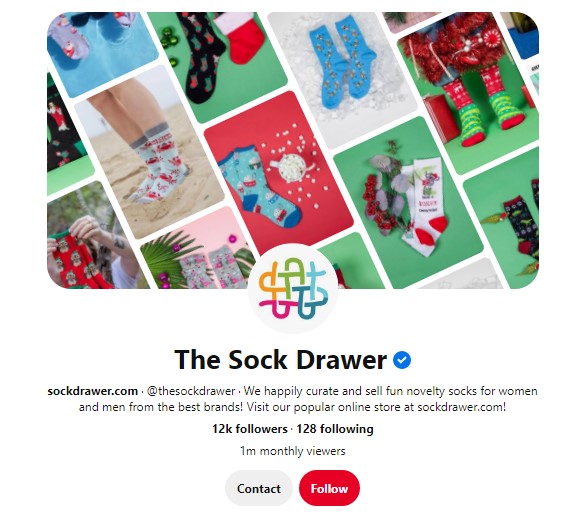
Usually, for eCommerce and inline stores, it’s easy to know the topics. It will be products that the brand sell.
In our example it will be…
- Women’s socks
- Men’s socks
- Pop culture design socks
- Animal socks
- Special features socks
- Custom socks
- Knee-high socks
- Compression socks
- Luxury socks
- Seamless toe
- Wide-calf socks
General Boards Layout
Brand Boards
You need to have your brand board.
Brand Board is a board you want to be recognized for. Nothing gets to pin here, but your brand product your brand content, pins with links to your categories pages anything that is yours and owns by you.
📌 PRO TIP: You want to have a brand board for every topic you want to be known for.
For our The Drawer Socks example it would be boards …
Major topic | brand name
Major topic first – because those topics are keyword searched by Pinterest
And you want your brand name there so that your brand name gets associated with those words.
📌 EXAMPLE: Socks for women by The Drawer Socks
General Boards
After you created your Brand Boards, you want to create general boards where you are willing to pin other people’s content in addition to yours.
Essentially you take your brand board “Socks for women by The Drawer Socks” and cut out your brand name from it. “Socks for women”.
Then you want to create more niche down boards.
📌 EXAMPLE:
- Knee-high socks for men
- Knee-high socks for women
- Compression socks for men and women
- Animal print socks for men and women
- Wide calf socks for men and women
- Seamless toe socks for men and women
Whatever topic you have products to place into, you are not limiting branding on these boards.
This is general layout you want to create.
Complimentary / Bait Boards
You don’t want to many of those. This boards should be…
- Centered on topic STRONGLY associated with your TARGET audience.
- Associated with any major holidays
📌 FOR EXAMPLE:
- Fun gift ideas
- Sport accessories
- Christmas gift ideas for women
Name Boards
Make sure to use strategic keywords when naming your boards, as they’ll make a world’s difference with your board’s SEO.
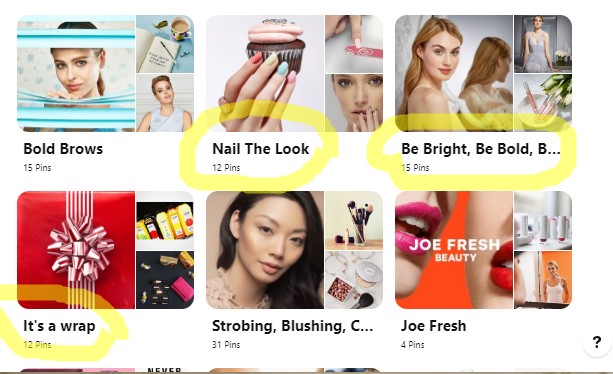
Everyone loves a cute board name, but try to avoid being “cute” without dimension — stay away from simply: “Yummy!”, “Fashion,” “Belts,” “Sandals,” or “Be Bright, Be Bold”.
The Anthropologie board names provide excellent examples, with strategic names including “First Home,” “Wellness & Beauty,” “Gift for Friend,” and “Outfit Inspo.”
Audit Board, You Already Have
Look at the boards that you already have.
Are this boards about…
- A product that you make
- About content that you make on your website (articles, videos, podcast and etc.)
- How people use your product
- Would your boards attract followers that are your target audience?
If you are an eCommerce or online store site, I strongly recommend starting to write articles about your product.
- How to match socks.
- Why do you want to choose knee-high socks?
- Best use for compression socks.
- Tips for keeping socks clean.
- How to make your socks last longer.
- Best detergent to wash your socks.
- What type of socks best match what shoe?
This type of content great. It answers questions your customers might have about your product.
Would Your Boards Attract Followers That Are Your Target Audience?
For example, if we created a board “Best Sports Socks for Men and Women” and pined a bunch of men’s socks in there. If your targeted female audience is sport-oriented, then this is fine.
But if you only have a couple of products that aimed at athletic women in the yoga category, or in walking type of activities. Then maybe the “Best Sports Socks for Men and Women” board will not hit your target audience. And you don’t need that board.
Organize and Archive Boards
You may run into two problems.
- You have too many boards and need to scale down.
- You don’t have enough boards
You Don’t Have Enough Boards.
If you don’t have enough boards to cover all your topics, here some ideas on how to build up more boards.
1️⃣ Go to Pinterest search bar and find out keywords for your topics.
❓ Remember you want to have that beautiful profile picture board?
✔ You may consider “The Sock Aesthetic” board, which is essentially a board with a bunch of photos of how socks are worn.
2️⃣ You may consider complimentary product boards if you need to.
📌 For example, Best Shoes for Socks.
Maybe you want to partner with a shoe company, then “best shoes for socks” is a great way to go.
3️⃣ Then you may consider holiday boards.
Christmas is an easy one – “Christmas Socks Gift Ideas”. You can pin your socks there as well as packaging ideas for gift tags and all ways to give your socks.
Maybe “Mother day Socks Gift Idea” can be another board or maybe “Halloween Costume Idea”.
The biggest idea that will help you to find a lot of great things to create boards about is going and finding more keywords. Put your keywords in a search and see what else pops out.
And the better you know your customers, the better you will be able to create this boards.
If some boards don’t fit your niche anymore, move them to secret or archive them without losing followers. Before doing this check your Pinterest analytics.
You Have too Many Boards
Archive boards, that you don’t need.
What to Check in Pinterest Analytics Before Archiving Board?
- Do you have a viral pin on these boards?
- How many clicks to your site board have?
- Do you still produce products or content for this board?
If you don’t have viral pins and the number of clicks low, then move the board to secret. Otherwise, move it into another board as a section.
For example, I did this on one of my accounts.

By archiving the board, you send Pinterest information no longer to send you the information in Smart Feed regarding this board.
Archive group boards if they no longer work for your strategy, but more about it later.
So, we talked about not having enough boards, having too many boards, and the general layout you want to have.
Now let’s talk about…
How to Fill Pinterest Boards.
And how to make this boards work for you on Pinterest.
📌 Pinterest Board Title and Board Description are cataloged by Pinterest in keyword and SEO.
So those two are REALLY IMPORTANT.
Optimize Boards Description for Clicks and Leads
Keywords are the basis for your content discovery on Pinterest search. Adding keywords into boards name and descriptions will help your target viewers to find your company.
Make your board description two to three sentences long in natural language. Sometimes I find it’s hard to put all keywords in natural language, then I can put them separating by coma at the end of the sentence.
📌 EXAMPLE DESCRIPTION FOR BRAND BOARD:
Socks products by The Sock Drawer. Including knee-high socks, funny socks, compression socks, wide-calf socks, seamless socks, and luxury socks.
Do not put hashtags in a board description.
📌 PRO TIP: Users come to Pinterest for ideas and inspiration for their purchase.
For our example of selling socks. When you enter “funny socks” in to search bar auto-suggest will show result for ideas, not product for sale.
Keywords from Pinterest:
- Funny socks for women
- Funny socks for men
Keywords from Google:
- Funny saying socks
- Cheap novelty socks
- Women’s patterned socks
- Toll socks for women
- Women’s socks
- Novelty crew socks
- Women’s novelty socks near me
📌 EXAMPLE OF BOARD NAME:
Funny Socks for Women – use of Pinterest and Google keywords.
📌 EXAMPLE OF BOARD DESCRIPTION:
Combine your sense of style and outfit idea with your sense of humor! These hilarious funny saying socks for women from The Sock Drawer brand. A huge selection of cool novelty ankle socks for women includes novelty crew socks, animal socks, holiday seasonal socks, funny phrases socks and custom made socks. See them all right here!
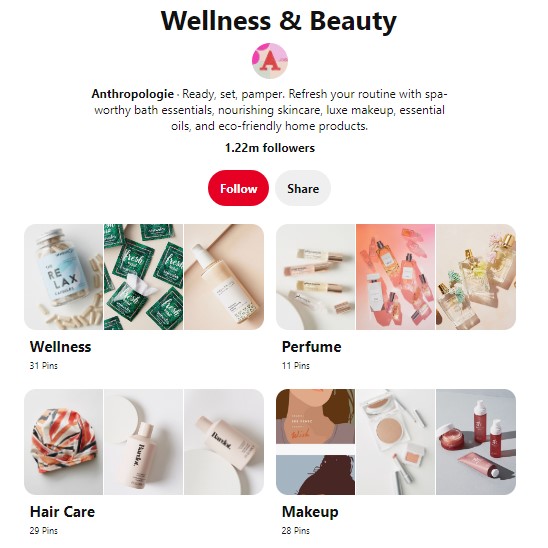
Anthropologie board titled “Wellness & Beauty” has a thoughtful description with good keywords: “Ready, set, pamper. Refresh your routine with spa-worthy bath essentials, nourishing skincare, luxe makeup, essential oils, and eco-friendly home products.”
📌 PRO TIP: When choosing a name for your board think about Pinterest keywords + Google SEO keywords! ❗❗❗
When people search for answers to their question. The Pinterest board will be shown to them in search if the name of the board and description coordinate with their search — giving you an added advantage in the Google search results page!
Group Boards
Group boards no longer have the reach they use to for promoting your business.
If you are actively pinning your pins to group boards, I would strongly suggest changing your Pinterest strategy and pin to your own boards first.
Archive all the group boards that no longer helpful to your business.
How to Evaluate Group Board?
- Does the topic still fit the brand?
- Are they still public on owners’ account?
- Is there activity on the board or does it seem to be dead?
- Do they have over 50 contributors? Less than 50 is better!
- How many followers are on the board?
- Who is pinning to this board and what?
- In Tailwind, analytics check how many times your pin was repined on the group board.
✔ If it’s your group board that you no longer need, then archive it, but before that please send a quick email or Pinterest comment to all contributors.
✔ If you are a blogger, course creator, or coach then consider joining up group boards with only a few friends who have a similar niche.
If you are an online store, eCommerce business product seller then you don’t need group boards at all.
How many boards should I have on Pinterest?
There is no magic number. When setting up (or cleaning up) your Pinterest account start with 10 to 15 boards, to fully optimize it.
Add 1 to 2 new boards to your account each month – until you get to about 25.
The average number of boards for top bloggers with 300K followers is 56 boards.
Ecommerce account can function just fine with 25 boards.
Group vs. Individual boards.
You definitely want to have more individual boards than group boards. If you don’t have any group boards, that is totally fine.
If you want number ratio, then it’s 2:1. You want at list two of your own boards to 1 group board.
Public vs Secret boards.
Don’t let the number of secret boards you have to outweigh the number of public boards you have.
And secondly, don’t let the secret board topic outweigh the public topic accounts. For example, I was talking about creating a secret board for trade show information, that is fine. But if you are creating a secret board for every trade show you go to, then you may end up with 20 trade show secret boards. And if your new eCommerce account with 25 public boards, you start to outweigh your public boards. Pinterest will get confused about what you care about.
If you want a number ratio, then it’s 2:1. You want to list two of your public boards to 1 secret board.
Pinterest needs to know what your profile is about so that it can share it with people that care about this thing.
That is auditing your Pinterest boards.
Have a picture of…
- What type of boards you want?
- Naming those boards well
- Writing board descriptions
- Creating subsection if you would like
- Pay attention to the ratio of content on your boards
- And evaluating your group boards
That is the quickest summery of “How to audit Pinterest boards”. It could take you anywhere from half hour to three hours. It’s not always quick and simple.
Brake it in a little chanks and do a few boards every day.
And again this is a foundation of your activities on Pinterest.
I know not everyone needs a regular hands-on approach, which is why I offer Pinterest audits to help other content creators find areas of improvement. After an analysis of your Pinterest account, a daily strategy, and websites – I will show what to improve according to the latest with Pinterest marketing.
Example of Pinterest eCommerce Accounts
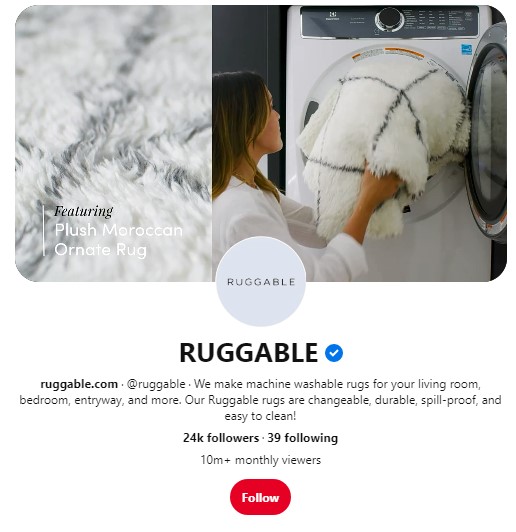
RUGGABLE – they make washable rugs.
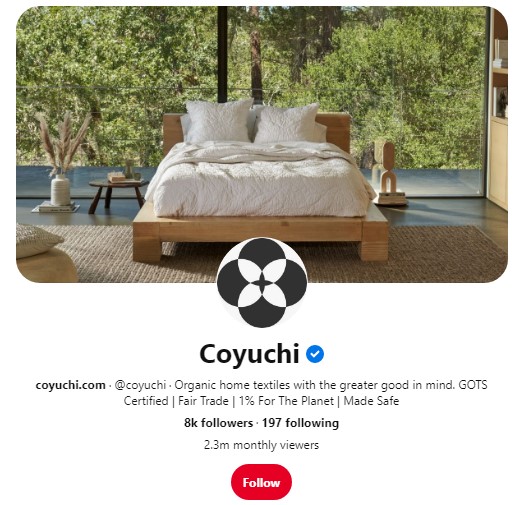
COYUCHI – Organic home textile.
Most Common Questions About Pinterest Boards for Online Busines, eCommerce, and Product Sellers.
Should I Delete Pinterest Boards, that I don’t Need?
No, you shouldn’t delete the board, archive it instead.
Sometimes businesses will create a board for example on how to set up a display for products at craft or trade show, they are going to.
Feel free to make a board and make it secret.
What is a healthy ratio of active boards to a secret boards?
You should have more active boards than a secret. On the side of caution no more than 2 to 1 ratios.
Should I pin only photos with my products?
If you want Pinners to shop your products on Pinterest, it’s ok to have boards that mix in the items you’re selling with more “inspirational” imagery.
Creating boards like this is the most strategic because they’re visually interesting, well-curated, and not too salesy (i.e. they’re organic and hold more value).
Once you’ve made your new boards always save your content to the most relevant board so Pinterest can best distribute it.
Should I do cover pictures for my Pinterest boards, if so why?
You can use one of the pins within the board as your cover. Choose images that represent your brand colors and board category/content.
Refrain from creating a specific board cover, because most likely you will change the board name a few times.
If you are planning to use Pinterest Story Pins, then definitely use the Pinterest board cover. Because Pinterest Story Pins send traffic to your profile.
Is board order important?
🛑 NO!!!!
Just make sure that your boards reflect what your business is about.
Moreover, different browsers will show your boards in a different order, and at least 80% or more of users see your Pinterest profile on mobile.
Should I use hashtags on Pinterest boards?
🛑 No, you don’t need to use hashtags on Pinterest board name or brand description.
Is it worth posting on group boards?
🛑 No. Group boards don’t help online stores, eCommerce, and product seller to get more customers, at all.
Is it okay to make a different version of the same pin and post it on the same boards (using the same URL link)?
👍 Yes. It’s Pinterest best practices in 2020 – 2021. Pinterest recommends creating up to 10 different pin graphics leading to the same URL.
Repurpose top-performing blog posts on your eCommerce site into pins. Combine the text with unique images and graphics by rearranging elements and colors, for example. The result could be 10 or more fresh, compelling pins based on one blog post or best-selling item.
Should I add a text overlay on my product image?
It depends on your niche. Pinterest’s best practices in 2020 – 2021 are to create a variety of pin images some just product photos, some with lifestyle photos without text, and some with text.
Do A/B testing to see what is popular in your niche.
Customers have different shopping styles.
Are horizontal pins worth posting?
Use vertical pins with the 2:3 ratio as Pinterest recommends, that could be 800x1200m 1000×1500. Also, play around with taller pins and square pins.

My three-part mini-series will give you an overview of how to optimize your brand’s Pinterest account and make sure you are getting the most out of your time and money.
✨ READ PART 1: “How to audit Pinterest profile.” https://modernfifty.tv/pinterest-profile-audit/
✨ READ PART 2: “How to audit Pinterest boards.” https://modernfifty.tv/how-to-audit-pinterest-boards/
✨ READ PART 3: “Are your Pins optimized?” https://modernfifty.tv/how-to-optimize-pinterest-pin/
Thank you!!1