

How to Do a Pinterest Profile Audit
How to do a Pinterest audit to improve your Pinterest business strategy – 3 part series with posts and video tutorials.
- If you have not had an audit in the past 12 months or ever,
- You hit a plateau with your Pinterest marketing,
- You want to attract your ideal audience,
- Increase your monthly viewers or gain more followers,
than this series is for you.
“You need the right pieces, in the right places using the most current best practices in order to maximize the results of Pinterest.”
With this post, I’m launching a three-part series about a Pinterest audit of your business account. This mini-series will give you an overview of how to audit your brand’s Pinterest account and make sure you are getting the most out of your time and money.
Next, I’ll get into how to set up Pinterest boards that highlight your products and are also optimized for search.
Then I’ll cover best practices for Pinterest Pins and your pining strategy.
✨ READ PART 3: “Are your Pins optimized?”

In part one – Auditing Pinterest Profile you’ll learn…
Pinterest Profile Audit
- What to look for in an audit
- Business name
- Profile photo
- Claim your website
- Claim YouTube, Instagram, $ Etsy
- Profile Description
- Banner
Let’s go!
This is the same methodology I use when I do Pinterest Account Audit.
A Pinterest audit will help you to see where you can improve your Pinterest presence and start to develop (or adjust) a strategy that’s tailored to your business objective.
“Fun fact: people who write things down are MORE likely to remember what they need to do and take action on getting them done.”
Before we dive in it’s important to know, that, just as a great Facebook page or Instagram profile is necessary, it doesn’t mean you’ll see instant success and explode your following. You must be active on the platform! For Pinterest, this means active pinning, new images, and utilizing your analytics.
If you like this video, be sure to 👉 SUBSCRIBE to my YouTube channel.
Why a Pinterest Profile Audit should be your first step?
Brands often begin by creating boards named for products or product categories and start saving Pins with no solid plan. Their primary goal is to sell more products or services.
Smaller businesses may be working with a Pinterest business account that was converted from a personal account which they may be wondering what to do with older Pins.
No matter how you began it’s important to have a strategy with measurable goals and audit your efforts periodically.
I know not everyone needs a regular hands-on approach, which is why I offer Pinterest audits to help other content creators find areas of improvement. After an analysis of your Pinterest account, a daily strategy, and websites – I will show what to improve according to the latest with Pinterest marketing.

Auditing Your Pinterest Account
An auditing should not be a one-time event for your Pinterest account. Best practice is to audit account annually because you created boards that didn’t work out or maybe you pivot content, Pinterest changed in ways that required to adjust.
🚀 PRO TIP: Use data from analytics to evaluate if new boards or new focused need to be made.
This is also a good time to pull back and take a higher-level view od your account to see if your overall goals are seeing progress.
CASE STUDY [Lifestyle Blog]
OBJECTIVE:
Optimize Pinterest as a search engine tool in order to drive website traffic and ultimately increase affiliate sales.
Leverage current blog content to build following and improve Google analytics.
TARGET MARKET:
For example: Women seeking mental and physical wellness. She has trouble sleeping at night, has little time for self-care. Due to various changes in work and personal life, she feels out of alignment with her authentic self.
She is on Pinterest seeking tips on different healthy, natural, ways to improve her looks, find new skincare products that work, reduce stress, improve her quality of life.
🚀 PRO TIP: We all use different social platforms to search for different topics, ideas, and solutions. What your ideal client use Pinterest for???
KEYWORDS ANALYSIS:
🚀 PRO TIP: You will save yourself a lot of time if you find your keywords before you start Pinterest account set up or audit.
Optimize all boards, pin description, titles, account description, and bio profile using keywords that are curated for your niche.
🚀 PRO TIP: Keyword help to improve SEO when relevant for the content as the Pinterest algorithm can detect keyword stuffing.
Use the Pinterest search bar and what competitors use in their pin descriptions/boards to find keywords for the target market. Note also what categories you have on your website. What keywords you want to rank for in Google.
EXAMPLE OF KEYWORDS:
- Health motivation
- Health tips
- Self love
- Self care
- Sleep
- Insomnia remedies
- Insomnia
- Work life balance
- Work life tips
All social media networks have algorithms. It’s their way of sorting what to post in their users’ feeds based on how relevant the content is when it’s published and by calculating the likelihood that the user actually wants to see that kind of content.
What to Look for In an Audit

The audit consists of several important components that make a significant difference to your account. They include
- Profile
- Boards
- Pins
- Pinterest to website connections
It doesn’t seem much, but there’s a lot of information that goes into each of these components. That’s why I decided to do brake information into shorter, more actionable pieces for you over a series of blog posts.
In this post I am covering how to audit and optimize your PROFILE.
Check Out Your Profile:
- Are you using a Pinterest business account?
- Is your Pinterest handle consistent with your other social media handles?
- Have you connected at least one social media account to Pinterest?
- Do you have your top 2-5 keywords in your profile?
- Are rich pins enabled on your website?
- Is your website confirmed on Pinterest?
- Do you have your showcase set up?
Profile Basics
Your profile is Pinterest page you see after you log in.
On mobile you’ll see your home feed also called the smart feed. When you click over to your profile page, you’ll see a banner, your profile image, featured boards, latest pins, etc. as you scroll down the page.
If you need to make any changes to your account, enter your settings (three dots in the top right corner).
Is your name showing as your business name? It should be your brand name, not your website. Most people can get about 35 characters in there (although for some it’s only 20), so adding a keyword there may be possible.
EXAMPLE: Modern Fifty TV (NOT modernfifty.tv)
KEYWORD EXAMPLE: Modern Fifty TV | Self Care
Brand name should always appear first! If you can’t fit a keyword in because your name is too long, you should still stick with your brand name.
NOTE: Sometimes Pinterest will not let you to change name.
The real benefit in using the same name across all platform will make your Pinterest page more search friendly.
When people search for your site or social channels on Google, your Pinterest page is more likely to show up and rank better in results — giving you an added advantage in the search results page!
What is the Best Profile Picture?
Have you ever wondered if you should use your brand logo or personal photo as your profile image?
This is a tough one to decide for some people! It doesn’t really matter which one you choose as long as it matches what your business does and what you use on other social profiles.
If you are your brand, use your own picture because it will perform better! If you are NOT your brand, then it’s best to use your company logo.
🚀 TIP: Make this profile image consistent across all your social media accounts!
Claim Your Website
Not sure if your website has been claimed? Check below your profile image. If the small world symbol has a checkmark on it, then your website has been claimed and you don’t need to do anything else as far as claiming your site.
Claiming your site is important because every time someone pins something from your website, Pinterest will know that it came from your site.
Only one website can be claimed on your account, but pins from subdomains will be credited to your account.
If you haven’t claimed your site, go to Claim in your settings to set it up.
Claim YouTube, Instagram, & Etsy
If you have these accounts, I recommend claiming them.
If anyone pins anything from these accounts, you want it to be associated with your Pinterest account!
It will add some rich pin data as well as some analytics.
Write a Winning Pinterest Description
Your Pinterest description has just 160 characters to explain who you are, what you do, and convince people to follow you. And the easiest way to do that is to write how you help.
Create a compelling, keyword-rich bio that attracts your target audience
HOW DO I WRITE A GOOD PINTEREST PROFILE?
- Keep It Short and Sweet.
- Use Keywords…But Don’t Stuff.
- Include Your Tagline.
Your profile description should contain your major keywords and your sub-major keywords (these keywords should reflect what your business is about).
Use the first sentence to explain who you are, or what your business does using strategic keywords. Get as many keywords in as you can using natural language.
The character limit has varied over the years but is typically around 120-160.
If you have room for a call to action (CTA), then be sure to add that in at the end (e.g. Get free DIY tutorials on the website!). Having a CTA in your bio is a great way to tell your future followers what they can expect and set your Pinterest profile apart from your other social channels.
🚀 PRO TIP: Do NOT use URLs because they aren’t clickable (and, honestly, no one is going to go to the effort of retyping it).
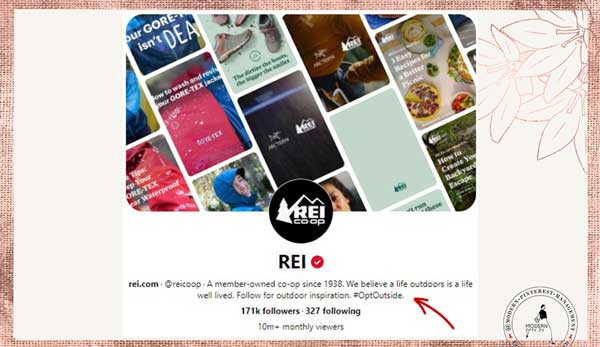
Consider having a branded hashtag for Pinterest. It’s also a good idea to place your branded hashtag in your bio, like outdoor mega-brand REI:
Customize Pinterest Banner
The banner can display different options for your account.
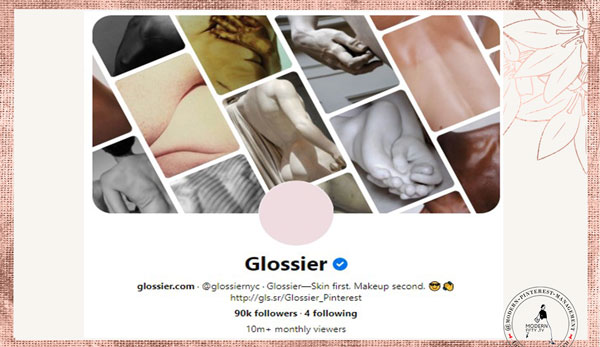
1) Choose board and only those pins will appear (YES!). Most recent pins (NO!) This option no longer available on Pinterest.
Please choose a board with only your brand’s content!
🚀 PRO TIP: Create a board specifically for your profile banner. Include vertical images (with no text) from your website that represent your brand on this board and set the banner to that board.
Great examples The Modern Proper and Glossier on how to do this well.
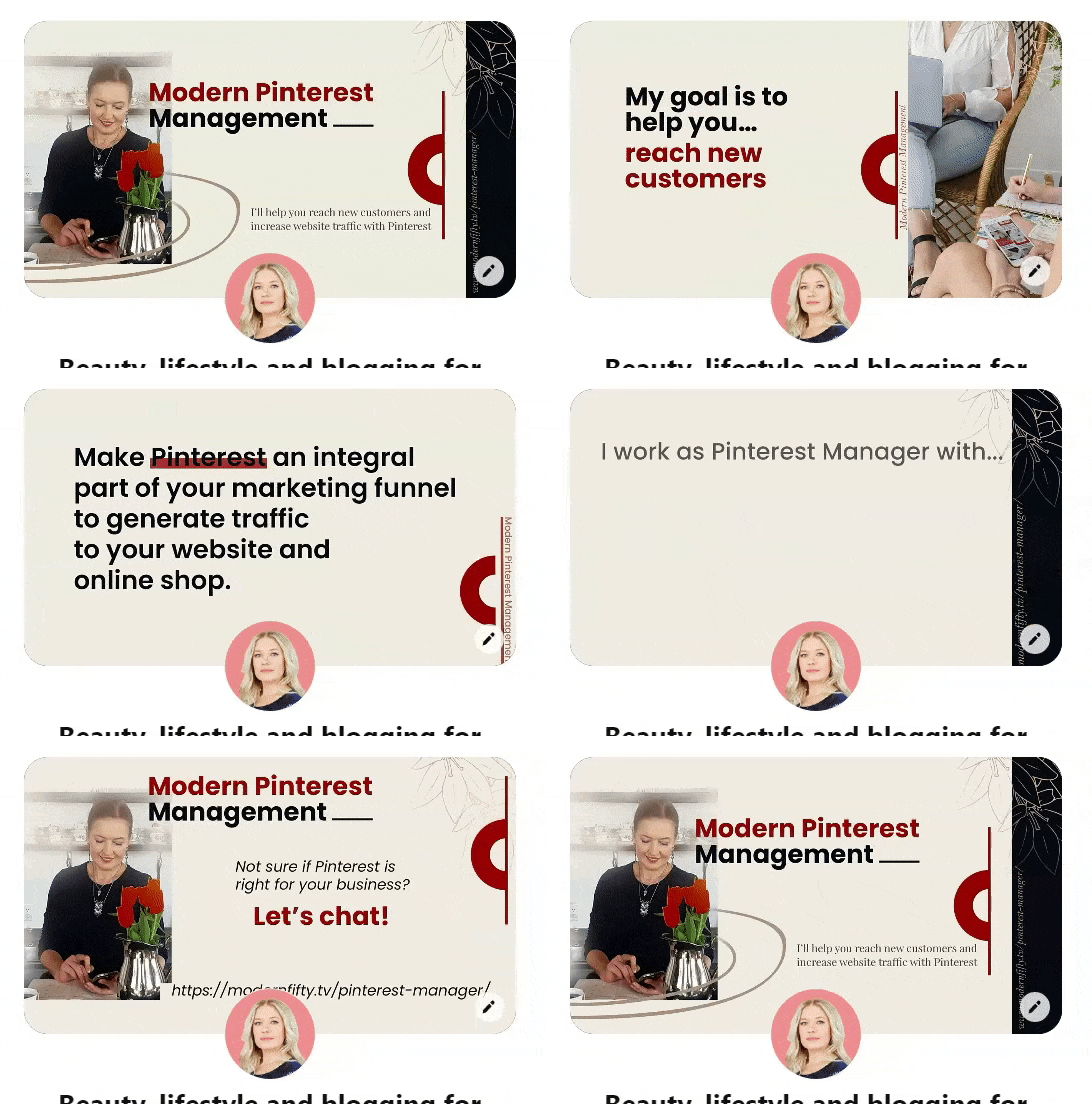
2) Video profile banners. You can see a great example on the Target account or the one created by me. ⬇⬇⬇
3) Static photo.
You can change your banner settings by clicking the pencil icon in the top right corner of your banner (you must be logged into your Pinterest account).
🚀 PRO TIP: Vertical images are a must because even though it will display square or horizontal images, they will stretch or crop to fit the vertical space, which means they’ll appear distorted. The ideal ratio for vertical pins is 2:3.
Add Location If Local
When you pin as a local business, I suggest adding into each of your descriptions the city and state. It is more likely to be found in search.
Boards
Set up, several niche-specific boards. Pinterest is placing more emphasis on personal boards over group boards. You need multiple boards for each topic that you cover.
READ MORE: How to do Pinterest audit – Boards.
How Valuable Is Your Profile to Your Success?
Only about 1% of Pinterest users will actually look at your profile, but this is a unique audience that’s really interested in the content you’re offering, so making sure your profile is set up correctly will help turn cold traffic into warm leads.
I know not everyone needs a regular hands-on approach, which is why I offer Pinterest audits to help other content creators find areas of improvement. After an analysis of your Pinterest account, a daily strategy, and websites – I will show what to improve according to the latest with Pinterest marketing.
Pinterest audit will help you see where you can improve your Pinterest presence and start to develop (or adjust) a strategy that’s tailored to your unique business goals.

Wondering if you need to make some improvements to your Pinterest account and strategy? Overwhelmed with where to start? Want to be sure you’re working in the right direction with your Pinterest marketing? With a Pinterest audit, I take a close look at your overall Pinterest strategy and account to give you a clear picture of where you need to improve your Pinterest strategy.
https://modernfifty.tv/pinterest-manager/
My three-part mini-series will give you an overview of how to optimize your brand’s Pinterest account and make sure you are getting the most out of your time and money.
✨ READ PART 1: “How to audit Pinterest profile.” https://modernfifty.tv/pinterest-profile-audit/
✨ READ PART 2: “How to audit Pinterest boards.” https://modernfifty.tv/how-to-audit-pinterest-boards/
✨ READ PART 3: “Are your Pins optimized?” https://modernfifty.tv/how-to-optimize-pinterest-pin/